Thanks for visiting my blog! See more about me here: About Me


If you’ve used Silverlight 2 much, you probably have already run into the issue with URI’s that can be specified in XAML (e.g. Image and MediaElement). When using relative URI’s for these elements, Silverlight 2 uses a “Site of Origin” resolution symantic. Instead of resolving the relative URI’s based on the website that the Silverlight 2 application is hosted on, it resolves it based on the site of the origin of the application (the .xap file). If the application is hosted on a site (i.e. http://mysite.com) and our .xap file is in a directory (i.e. http://mysite.com/ClientBin), then a relative URI will be resolved based on the locaiton of the .xap file. This means that a relative URI like “/foo.jpg” we resolve to “http://mysite.com/ClientBin/foo.jpg” *not* “http://mysite.com/foo.jpg” as you might expect. In fact, changing this to “…/foo.jpg” doesn’t change anything. It thinks that the directory of the .xap file is the root of the URI, no matter what you do. Lastly, this also means that if your .xap file is hosted on a site other than your website, these URI’s are relatvie to that remote web server, not yours.
These URI’s are special because relative URI’s look in the .xap file itself first. That’s why you can include images in the .xap file and use them with relative URI’s in Silverlight 2 without having to have a special syntax to specify the xap file itself. In addition, this syntax is meant to avoid having to learn the cryptic pack:// URI syntax that is used in WPF to retrieve items. So what can we do to simply this?
My initial approach was to try and make a XAML markup extension or something else nearly as arcane, but now I have a simple approach. I have started to place my .xap files at the the root of my web applications. This is in stark contrast to what the tools suggest (e.g. using a ClientBin directory), this means that these relative URI’s will act like the root webserver. So far I have not found a drawback to this approach.
To do this you will change the directory from ClientBin to simply blank. For example, when you view the silverlight applicaitons (in the website properties), you can use the “Add” button to link a Silverlight application to your website:
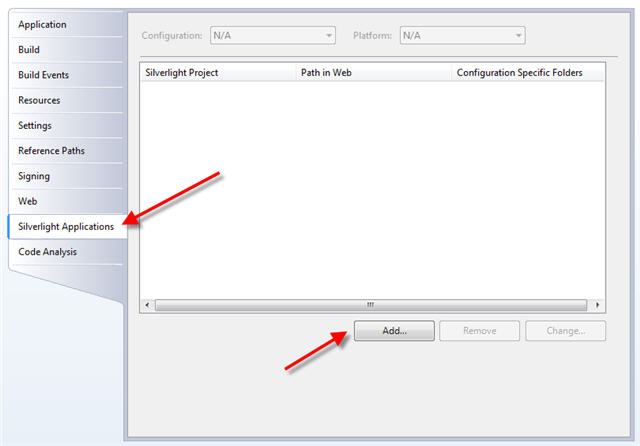
When you add the Silverlight application, make sure and clear the Destination folder:

This will place the .xap files in the root of the web site and therefore relative URI’s will resolve just like every other relative URI. Voila!
If you know of a good reason not to do this, please comment below. I am vetting the technique to make sure its a good piece of advice to give.
