Blend Container Editing

Silverlight Logo

UPDATE: The client doesn't mind that I mention them so I'll tell you that its the great people at SchoolMaster.  Siebrand Dijkstra and his crew are doing some interesting things with Silverlight.

I love teaching the Silverlight Tour as pretty much every class I teach I learn something new. I get used to certain features of Blend that do what I need but because of some bugs, I have gotten too good at hand-editing my XAML. In my current class (a private class for a Dutch software company), one of their very bright engineers showed me this trick:

I was explaining how you can specify the rows/columns in the main grid by clicking on the top/left bars as seen below:
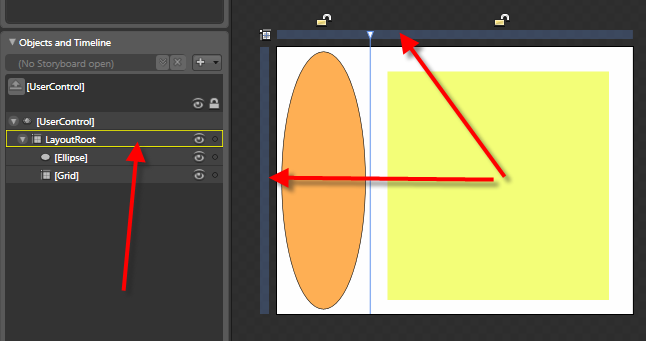
I was starting to explain that the nested grid must be edited by hand or by using the row/column editor when I hand raised in the back.  He explained that if you double click on a container (or a ContentControl), it will switch to editing that container with the same functionality.  He pointed out that the yellow outline indicates the current container focus:
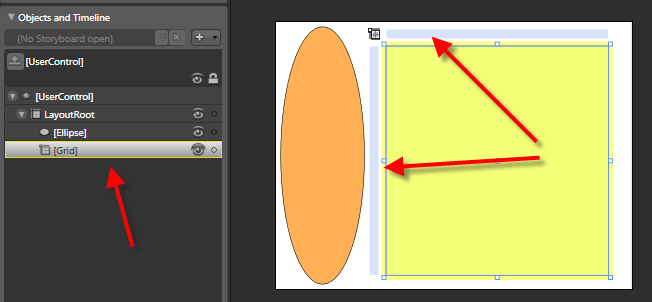
Cool!  That will make a lot of my editing much easier.  I started playing around with the feature when I got back to the hotel and found out that it works with ContentControls too (Button, etc.):
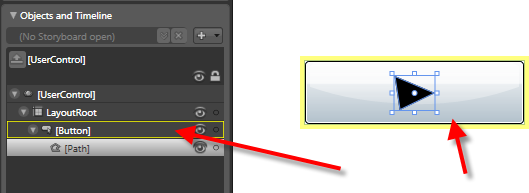
This way I can draw directly inside a button.  I always used some odd tricks to get this to work.  I hope this is relatively new...I'd feel silly if its been there since v1.0.

Let the ridicule begin!

Comments:

Gravatar

The opposite of ridicule, we learned a few things too!

Gravatar

the yellow outline has been around as long as I remembered.

Gravatar

Btw, it was great hearing your thoughts and insights on the Herding Code podcast. One thing stood out though, the only person I've seen referring to RIA as Rich Interactive Applications has been Scott Barnes, a microsoft evangelist.

Gravatar

Classic example of knowing the workaround and never think about alternative solutions :-) UR just too smart U would've taken the extra time to figure it out yourself if you didn't understand the underlying XAML.

And I agree with Joost, bi-directional information exchange is more fun :)

Gravatar

I don't want to let you down, but this feature is available since 1.0.. I always double-click in rows of my object tree because I used to do so in Flash to rename the layers

Gravatar

I think I saw this on a blend tutorial video actually, early on. Like you, I find when I have the time to play SL I am hand coding the xaml and after many, many years of drag drop I kinda like the typing. But dont you love it when you are showing somebody something and they say why didn't you just ctrl alt f10 (or something like that) and you go wow. I came to the conclusion decades ago that anyone who thinks they are an expert and know it all are either incredibly smart or incredibly ignorant. When your green your growing.

Gravatar

Hi Shawn,

I was frustrated trying to work with some complex grid layout in Blend - this save my lunch - thanks for sharing. :-)

David Roh

Gravatar

This tip was shown on the first Blend post by Master Gu back in february:

http://weblogs.asp.net/scottgu/archive/2008/02/28/first-look-at-using-expression-blend-with-silverlight-2.aspx

My question is: how do you get out of this mode ?

Gravatar

I learn something new in Blend almost every day I use it. I too am "too good at hand coding XAML". Somtimes I get frustrated with Blend so I jump into the code. For example, I have not figured out how to set the start and end coordinates for a Linear Brush in Blend. I always jump into the XAML and hand type it.

Maybe someone will show me the light on that one :)


Save Cancel