Thanks for visiting my blog!

Url: http://wilderminds.blob.core.windows.net/downloads/printingfun.zip
As i’ve discussed with a number of my customers (with apologies to Siebrand) I never thought we needed printing. Printing on the Internet has a durable solution especially when it comes to to line-of-business applications: PDF. There are a plethora of report writing solutions that work and so using XAML to print has always been an unnecessary feature to me. But as most of you know the Silverlight team ignored me and listened to all of you and introduced a printing stack to Silverlight 4.
How It Works
The Silverlight 4 printing support allows you to specify a XAML tree to print. Overall its pretty simple. It all starts with the PrintDocument class. This class exposes several events that are used to call back to ask you about how to print individual pages. First, let’s start with the simple PrintDocument creation:
PrintDocument doc = new PrintDocument();
doc.DocumentName = "Sample Print";
doc.StartPrint += new EventHandler<StartPrintEventArgs>(doc_StartPrint);
doc.PrintPage += new EventHandler<PrintPageEventArgs>(doc_PrintPage);
doc.Print();
When creating a new PrintDocument, there is a simple pattern: set the document name, handle the events and start the print process. The document name is the name that shows up in the spooler (at least in Windows, couldn’t test it on a Mac). The StartPrint/EndPrint events are called before and after and are mostly used for setup/teardown of print elements. The Print method starts the print process and asks the user to specify a printer. After the printer is choosen, the print system calls the PrintPage event sending in printer specs determined from the printer itself:
void doc_PrintPage(object sender, PrintPageEventArgs e)
{
  // Stretch to the size of the printed page
  printSurface.Width = e.PrintableArea.Width;
  printSurface.Height = e.PrintableArea.Height;

  // Assign the XAML element to be printed
  e.PageVisual = printSurface;

  // Specify whether to call again for another page
  e.HasMorePages = false;
}
The PrintPage event passes in a PrintPageEventArgs object that contains a couple of pieces of information. The most important are the Width and Height which can be used to help size your XAML before being printed. It also allows you to specify the PageVisual which is any UIElement-derived element to be printed. Typically this is either a single control (e.g. DataGrid) or a container for other elements. You can also specify the whole page if you’re just doing page printing. Lastly, you must specify whether there are more pages to print with the HasMorePages property. When HasMorePages is set to true, the page is printed and the PrintPage is called again to print the second page.
Caveats
I suspect the printing system will continue to go through some changes as currently its pretty rudementary. In addition, there are some behaviors that feel like bugs (though not confirmed as bugs yet).
The most annoying of these is how no matter how large you make an element that is in your visual tree, its still clipped based on the Silverlight Control size. For example, here is a DataGrid that i’ve resized to the page size (using the code above) but its still only showing elements that are on the Silverlight page:
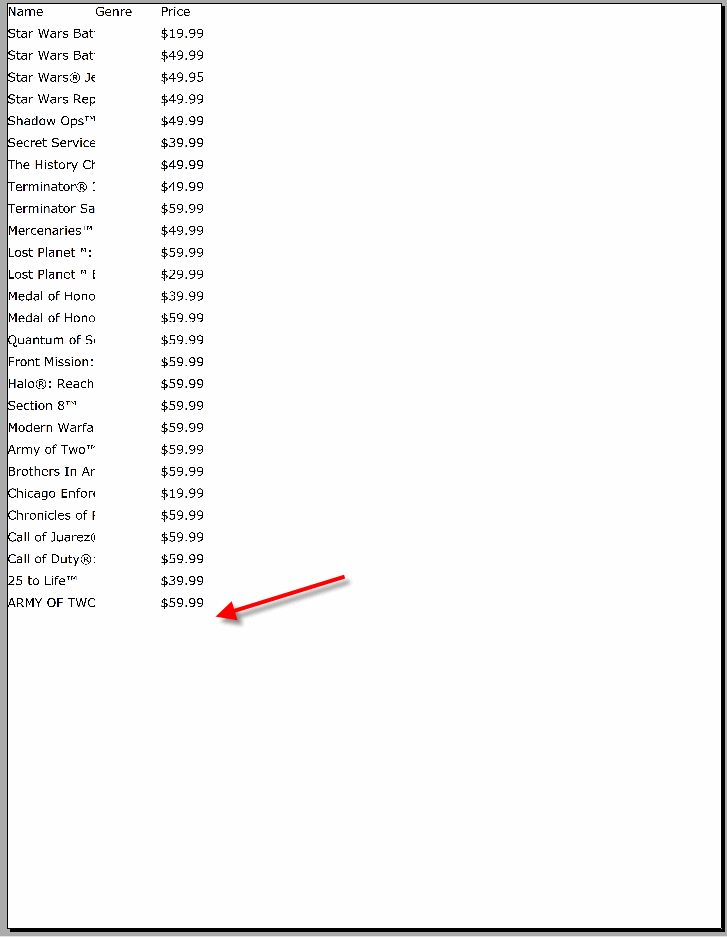
Click to view the PDF
Creating the page directly with code seems to work better, but the problem there is that anything complex at all requires the code to be complex. Being able to use Blend to create them would be better. My other nit that I suspect may be addressed is the ability to specify printer settings like Orientation, Color and resolution.
Overall it works fine, but be aware that its accomplishing this via the WriteableBitmap API. This means that it is taking the elements and rasterizing them and sending the one big image to the printer. There are two side affects here:
- The print job size is going to be large as its just a page-sized bitmap. For a typical 600x600 DPI printer, the size of the bitmap could be very large which means more memory consumption and slower printing.
- Printing to PDF’s loses any textual relationship to the PDF. That means that if you print from SL4, its a single image so users will not be able to index or search the PDF for information since the textual information is lost.
Overall, I am glad they added it…but its still an adjunct to real report writing. Its not a replacement. When you need to take a graph and dump it to the printer quickly, this facility really helps. Here’s a link to this example:
http://wilderminds.blob.core.windows.net/downloads/printingfun.zip
