Silverlight 4 Find: No More Whitelisting Fonts

Silverlight Logo

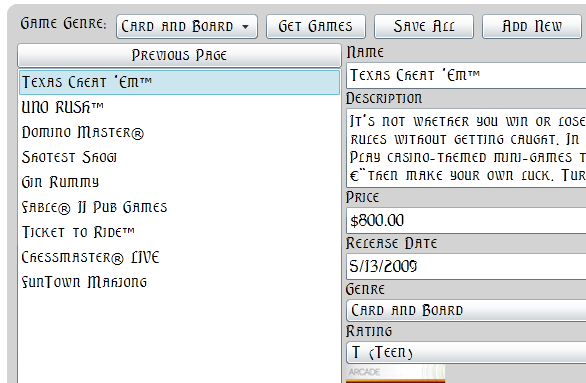
I just found out that in Silverlight 4, the fonts are no longer whitelisted to the ten fonts out of the box.  Silverlight will now use any font that it can find on a machine without embedding. For example, in my RIA Services sample, I changed the font to Elysian (a font I have installed) and it picked it up:

SL Fonts

I am told that soon you'll be able to iterate through the fonts to allow users to pick fonts, but it doesn't look like its included yet.

Wow...

Comments:

Gravatar

That'll be very helpful to app we are developing
Can't wait to give it a try to what you said

Gravatar

Hi Shawn,
In your blog you said all fonts will be available in silverlight 4. that would be amazing feature.

Issue we have is: Currently we are converting our legacy apps into siverlight and a major issue is with fonts. Legacy apps supported any font in client machine like MS Sans Serif fonts.

After reading your blog, I went ahead and installed SL4 and tried to use MS Sans Serif fonts but didn't succeed. Since I am using windows, MS Sans Serif font is in ttf format in windows folder on both client and server.
Xaml i have is
<TextBlock Text="a b c d e f g h i j k l m n o p q r s t u v w x y z - changed"
FontFamily="Microsoft Sans Serif"
Canvas.Top="20" FontSize="20" />
Please let me know how to get this going. Thanks for your help in advance.
Thanks.

Gravatar

That should be awesome.

But does it include in the .xap file ? I don't think so, unless you set the BuildAction accordingly.

I have been trying to get a custom font to be included in my Silverlight App. Wondering how to do it in Silverlight 4.


Save Cancel