Thanks for visiting my blog!
Url: http://wilderminds.blob.core.windows.net/downloads/HandledWithCare…
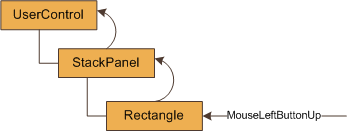
 The way that events are handled in Silverlight occassionally surprises people. For the uninitiated there are two types of events in Silverlight, direct and routed. Essentially direct events are events that one one type of element can fire and do not support any type of bubbling. The MediaEnded event on the MediaElement is a good example of this. The other type of event is a routed event. In this type of event, the event is bubbled through the visual tree. In Silverlight, the way it works is exactly the opposite of what you might expect from Win32 programming (e.g. WinForms, VB6, MFC, etc.) Routed event bubble from the most deeply nested element to the shallowest element. For example, when a MouseLeftButtonUp event is fired (mouse and keyboard events are routed events), the item directly under the mouse gets the event first, then its parent and so on:
Any control along the way can tell the routed event that it is handled which stops the bubbling from happening. While this is generally good practice (so everyone doesn’t need to know about something if someone has done something about it). Many of the standard controls handle events that they need. For example, the Button class handles the MouseLeftButtonUp routed event. But what happens when you want to be notified even if it has been handled? Luckily there is a way.
The trick is to use the AddHandler method on UIElement. For example, consider this XAML:
<StackPanel x:Name="LayoutRoot"
            Background="White">
  <Button Height="25"
          Width="100"
          Content="Click Me!"
          x:Name="clickButton"/>
  <Button Height="25"
          Width="100"
          Content="AddHandler"
          x:Name="addButton" />
</StackPanel>
When we handle the MouseLeftButtonUp event on the LayoutRoot, we can click on the clickButton and the event never fires. But if we click outside the button, it works. To be able to handle ‘handled’ events, you have to use the UIElement.AddHandler method. This method takes a routed event, a delegate of the correct type and an optional argument to specify whether the handler should be called for ‘handled’ events:
LayoutRoot.AddHandler(
   // Must be a RoutedEvent
  UIElement.MouseLeftButtonUpEvent,

  // Specify the right Handler
  new MouseButtonEventHandler((o, args) =>
  {
    MessageBox.Show("Worked even though it was handled!");
  }),

  // Respond to "Handled" events
  true);
Once the AddHandler is added, the click on the button will also call the MouseLeftButtonUp event specified in AddHandler. Grab the code and take a look yourself! (NOTE: This is a SL4/VS2010 example but the same code would work in Silverlight 3)
http://wilderminds.blob.core.windows.net/downloads/HandledWithCare.zip
