Ranting and raving about anything I feel like complaining about.

Silverlight 2 and Google Chrome

Url: http://www.silverlight-tour.com

Silverlight Logo

LOTS OF UPDATES: Read down to see more info.

I just installed the Google Chrome browser and to no one's surprise, it doesn't support Silverlight 2. Not sure why it doesn't work since it supports WebKit. What I find most interesting is that it thinks its rendering it. It may be Google's Plug-in/Process model that is breaking it.

To see what I mean, visit my http://www.silverlight-tour.com site. On that site, I test to see if the plugin can load and show a non-Silverlight version of the map when Silverlight isn't supported. When it is supported, I show the Silverlight app. When you follow the link you'll see that the Silverlight 2 app is taking space, just not loading. So the Silverlight.js script thinks its supported and tries to load it. Hopefully we'll hear more about this soon. Keep tuned and i'll let you know what I find out.

UPDATE: Google's Task Manager definitely shows that Silverlight 2 is loaded in a separate process, but interestingly the page with Silverlight is getting odd info in the Task Manager (e.g. no memory):
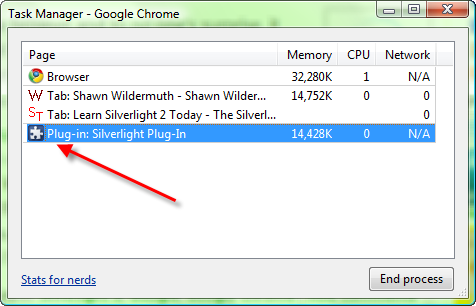
Silverlight 2 in Google Chrome
Another UPDATE:

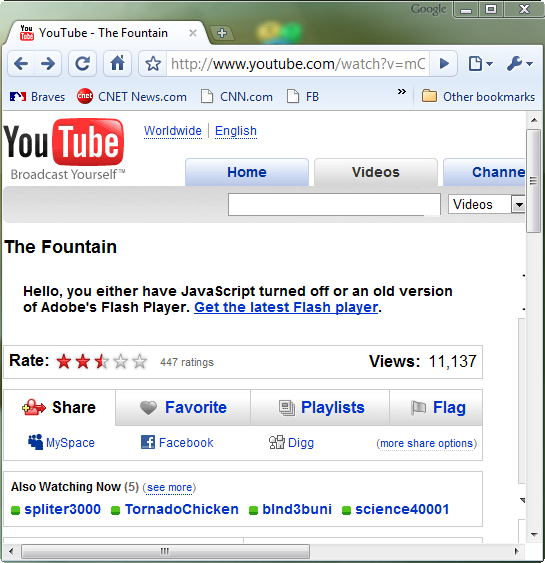
Flash doesn't seem to work either:


After re-running the Flash installer it now works.  Must have had a heads up to a fix that was required.

UPDATE: Instead of not working, Silverlight 2 its just sorta working. Sometimes yes, sometimes no.


Comments

Gravatar Flash works, you just need to re-run the installer after Chrome is installed.
Gravatar Yeah, it's sorta working with my SL2 stuff as well. It seems to render, but the interaction is terrible.
Gravatar Same problem here. It kinda works, but performance is horrible and interaction is very flacky.
Gravatar Yeah for this to be useful I need Silverlight to work.
Gravatar Did you try both Silverlight v1.0 and v2b2 ?
Gravatar It only updates the display if focus leaves and reenters the browser tab. For example if you are viewing a interactive chart with a hover over pop up it only gets displayed once you exit focus from the chrome tab or enter focus on the tab.
Gravatar If you resize the browser then you'll see your interaction. For some reason any events aren't being rendered immediately - could this be related to the new Javascript engine that Google have developed
Gravatar It seems to get frozen when I just want to see the official Silverlight Show Case, besides the whole browser gets frozen, not only a particular tab.
Gravatar ping back from Samiq Bits [http://bits.samiq.net]

[... Since, along the Webcast they showcased YouTube working happily in Chrome, I knew what to expect, although I also found out that there has been people not that lucky...]

from "Silverlight and Flash running on Google Chrome"
Gravatar Besides a few microsoft sites, I haven't come across any others that use Silverlight yet. Obviously Silverlight support would be way down on their list of priorities.
Gravatar Bro, you can't probably because it's in another physical process. Unless it can talk cross-process, we are screwed.
Gravatar It works in full screen mode.
Gravatar I seems to 'forget' to update the main thread of the tab once the page is loaded.. the apps are running alright, its just that they're not updating.. Only if you loose focus and then get focus again it updates 1 frame (try alternate clicking on the main window and the address bar)

Matthijs
Gravatar Flash wasn't working yesterday and today it is. weird.
Gravatar Yeah, the plugin support is a bit wonky right now. No official Silverlight support for it yet. I'll let you know if I hear otherwise.
Gravatar I tried Chrome late last night and Flash was working just fine - no need to re-run any installer. Note that without an adblock plugin, that was a BAD THING. :) I did hear from a Flash/JS guru that communication between Flash and JS doesn't work in Chrome, which breaks his app.
Gravatar despite the rumors, i'm finding Chrome's speed to be inconsistent; it seems to alternate between going lightning fast and then hanging for no apparent reason...
Gravatar I can verify the problem with updates only occuring on loss of focus (SL2b2). I have posted this to Silverlight forums: http://silverlight.net/forums/t/24133.aspx
Gravatar Relax Folks, Google Chrome still in beta well actually I see it as a preview version but all your isues will be gone on the RC's.
Gravatar Also for the record, You can get the source code of the browser to see how Chrome works, it is very clean and organized, it is great that Google Chrome is OpenSource. Freedom Rocks!, Hurray Google and OpenSource World!.
Gravatar Has Google ever released anything as RC? They even still ist Gmail as beta.
Gravatar silverlight 2 beta 2 appears to work when running full screen
Gravatar I installed Chrome at the very first day of its release.
My first test with Silverlight application (Beta 2) but it fails.
It actually rendered the SL application but certainly not working correctly.
fatboy is right its working fine with full screen mode check http://kenwatts.blogspot.com/2008/08/digital-logic-simulator-in-silverlight.html
Gravatar Strangely, I can view Silverlight 2 in Chrome... but only for certain sites..

http://i36.tinypic.com/214xmk4.jpg
Gravatar Solverlight is hardly working... well it hardly worked smoothly on any browser for me. Kept on getting popup errors. On the other hand, Flash ran instantly, I was surprised how come Flash already installed, then I figured it's using the shared plugins from Firefox?!

Either ways, the Flash player looks smooth on Google Chrome.
Gravatar Try this : http://www.shinedraw.com/3d-illusion/flash-and-silverlight-3d-image-rotation/
You will see that Silverlight process is only run when you scroll or resize the window. I think they didn't hooked the "main" function of the process at the right place.
Gravatar you guys are using the nightly builds of Google chrome right? flash still jumps every once in a while but in build 20089ironic build #) silverlight is working perfect including flash and java without reinstalling... (i believe the official beta was 1609)
Gravatar Crome is in direct competition with Microsoft. It is NOT surprising that Silverlight is not playing nice. Microsoft play's dirty, and I believe this is just one instance. Here is another example... attempt to edit an OpenOffice document saved in Microsoft's OneNote. You will not be able to. However, do the same thing with another document created by Microsoft Office or any other program and it works fine.

Add a Comment

*
*
*