

This is the second of ten parts. The topics will be:
- 1: A New World
- 2: Architecting JavaScript (This Post)
- 3: A Better CSS
- 4: Debugging
- 5: Joy and Pain of jQuery Plugins
- 6: Packaging Assets
- 7: Distributed Version Control
- 8: Working with Facebook
- 9: Mobile Pages
- 10: Deploying to the Cloud (upcoming)
Architecting JavaScript
Working with JavaScript can be daunting. In the past, I’ve seen some projects with just a handful of huge files that become difficult to manage. So in architecting what I needed to build, I wanted to adhere to the idea that there was common code and there was view-specific code. There are two different classes of JavaScript that I care about: libraries (i.e. not my code) and site code (i.e. my code).
For now, let’s segregate these two types of code into separate directories as shown below:
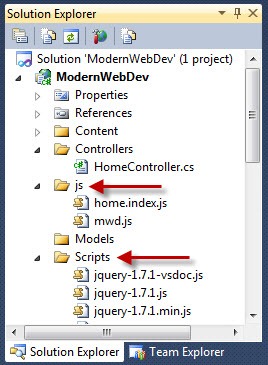
The scheme of these directories doesn’t matter, but I decided on keeping the Scripts directory since Nuget packages like to update to the Scripts folder. You’ll see in a later post when I talk about packaging why I separate these. Most of the time I am ignoring “not my code” and opening “my code” quite a lot.
One strategy I’m using is to load all the scripts on every page. Our total size of my scripts is not enormous and I expect that the initial hit of caching the script(s) on the first page will mean that subsequent pages will be faster. I’ll talk about how we are going to package the scripts in a later part of this series, but for now I can just include all the scripts of our project in the ‘master page’ (i.e. _Layout view):
<!-- _Layout.cshtml -->
<!DOCTYPE html>
<html>
<head>
  <meta charset="utf-8" />
  <title>@ViewBag.Title</title>
  <link href="@Url.Content("~/Content/Site.css")"
        rel="stylesheet"
        type="text/css" />
  @RenderSection("StyleSheets", required: false)
</head>
<body>
  @RenderBody()
</body>
</html>
<!-- We'll use a packager later, don't freak out guys -->
<script src="@Url.Content("~/Scripts/jquery-1.7.1.min.js")"
        type="text/javascript"></script>
<script src="@Url.Content("~/Scripts/modernizr-2.0.6-development-only.js")"
        type="text/javascript"></script>
<script src="@Url.Content("~/js/mwd.js")"
        type="text/javascript"></script>
<script src="@Url.Content("~/js/Home.Index.js")"
        type="text/javascript"></script>


```csharp

This means that each page doesn’t need to add their own scripts (in fact, when I package them, I’ll just include all the scripts in the /js/ directory). This should result in less friction at the cost of an initial page load of a larger script which I am not worried about for desktop use (for mobile, I’ll change this strategy as you’ll see in a later part of the series).

Originally I had planned on having a script per page (if necessary) then just including it on the pages required but that meant I needed to be aware of code collisions and inclusion on each page. To combat this a JavaScript namespace can help segment all of my code in it’s own object so I don’t pollute the global namespace. This is just like in .NET where you will create namespaces for your classes. Though JavaScript doesn’t have a namespace as such so a named object is good enough to do the trick:


```js
// mwd.js
(function (m, $) {

  m.setStatusMessage = function (message) {
    $('#status-message').text(message);
  }

} (window.mwd = window.mwd || {}, jQuery));
This works because of line 7 (highlighted). It executes this anonymous function creating the “mwd” object if it doesn’t exist. It passes in this object (as the m variable) so I can add any global data/functions to the object. The first script to run will not find the ‘window.mwd’ object so it will create a brand new object. Subsequent scripts (which will also have this function wrapper around it) will find the ‘mwd’ object and just pass it in. This way every script that uses this convention will add to the namespace object with our code and data. This simplifies the problem of script loading ordering problems and prevent name collision with objects in the global namespace. You can see that in the above that the mwd object is having a new function added to it. Since it’s an object on the window object, we can access this function from any script but only exposing a single global object.
For page specific code, the function wrapper is still used:
// home.index.js
(function (m, $, undefined) {

  m.initHomeIndex = function () {
    $("#main-section button").on("click", function () {
      m.setStatusMessage("clicked");
      // This works too
      //mwd.setStatusMessage("clicked");
    });
  };

} (window.mwd = window.mwd || {}, jQuery));
This approach of using an initialization function works as this script just registers the startup function for this page but doesn’t call it. This allows me to call the script on my individual page. This is especially helpful if I need to send in some state to the initialization (i.e. some data from the controller).
You can see the highlighted line is calling a common function that is defined in a different .js file (the mwd.js) and this just works as this code isn’t executed until after all the extensions to the mwd object are already added by all the scripts.
My method for calling the initialization function is to use an optional section on the Layout view that wraps whatever the individual page uses for an initialization (though not all pages will need initialization functions):
<!-- _Layout.cshtml -->

...

<!-- I'll use a packager later, don't freak out guys -->
<script src="@Url.Content("~/Scripts/jquery-1.7.1.min.js")"
        type="text/javascript"></script>
<script src="@Url.Content("~/Scripts/modernizr-2.0.6-development-only.js")"
        type="text/javascript"></script>
<script src="@Url.Content("~/js/mwd.js")"
        type="text/javascript"></script>
<script src="@Url.Content("~/js/Home.Index.js")"
        type="text/javascript"></script>
@if (IsSectionDefined("Init"))
{
  <script type="text/javascript">
    $(document).ready(function() {
      @RenderSection("Init", required: false)
    });
  </script>
}

```csharp

This way if the Init section is defined on a view, I wrap the init code in a jQuery ready call so that it gets called once the page has loaded.  The individual view looks like so:


```xml
@{
  ViewBag.Title = "Index";
}
@section Stylesheets
{
  <link rel="stylesheet" href="@Url.Content("~/Content/Home.Index.css")" />
}
@section Init
{
  mwd.initHomeIndex();
}
<h2>
  Index</h2>
<section id="main-section">
  <div>
    This is a client-side example!</div>
  <button>
    Show Message</button>
</section>
<footer>
  <div id="status-message"></div>
</footer>
If this were a strongly typed view I could have send date into the initHomeIndex function by JSON serializing onto the page. This allows me to efficiently have my view code added to every view but only call it on the particular views I need it. This is not just for calls that are necessary per view, but could be any shared code as well.
There are other strategies for doing this (as Dave Ward (@encosia) explained using a class on a body tag with the controller and view name) but for our needs this was the most straightforward since we needed initialization data on a number of different views.
This is a pretty universal way of handling this that worked well for me. One thing I ran into was that our Layout view wanted to have some code/markup that was only to be used during release builds (i.e. Google Analytics), I was surprised that Razor didn’t allow me to test for #DEBUG builds. To fix this, I added an extension method to the HtmlHelper class:
using System.Web.Mvc;

namespace ModernWebDev.Helpers
{
  public static class HelpHelpersExtensions
  {
    public static bool IsDebug(this HtmlHelper htmlHelper)
    {
#if DEBUG
      return true;
#else
      return false;
#endif
    }
  }
}
As this HtmlHelpersExtensions class would probably be a placeholder for a number of extensions for our use, I changed the web.config in the Views directory (not the site-wide one) to include my Helpers namespace on every view:
<?xml version="1.0"?>
<configuration>

  ...

  <system.web.webPages.razor>
    <host factoryType="..." />
    <pages pageBaseType="System.Web.Mvc.WebViewPage">
      <namespaces>
        <add namespace="System.Web.Mvc" />
        <add namespace="System.Web.Mvc.Ajax" />
        <add namespace="System.Web.Mvc.Html" />
        <add namespace="System.Web.Routing" />
        <add namespace="ModernWebDev.Helpers" />
      </namespaces>
    </pages>
  </system.web.webPages.razor>

...

</configuration>
This in a convenience and not necessary, but knowing you can add namespaces to every razor view is a great help so you don’t have to annotate a number of @using statements at the top of every view.
I could then use the new extension method to have conditional code in our Layout view:
<!-- _Layout.cshtml -->

...

@if (!Html.IsDebug())
{
  <div>Placeholder for Google Analytics</div>
}
What I’ve shown you so far may have some of you scratching your head because the separation of these JavaScript files means that you’re probably not getting any intellisense. I made a decision to just forgo it. If Intellisense is crucial to you, there are some options (none of these were worth my trouble):
- Adding a comment on top of every .js file to the Visual Studio intellisense file to get jQuery intellisense but it didn’t help with overall intellisense.
- Using a 3rd party plugin (i.e. R#) to add the intellisense.
- Use a non-Visual Studio editor (i.e. WebStorm or other editors)
All of these are adequate solutions, but they all seemed to slow down my development and I am an old guy who can get by without it. YMMV.
Much of the process of writing the JavaScript can’t be adequately summarized until we get to the debugging process I used in this project which I will cover in the next part of this series. Good hunting!
Here’s a link to the version of the source code so far:
